Friday, 29 August 2014

#1 Star Pattern Program in Java


In the program the following star pattern will be printed.

At first, we get the number where we want to print the star pattern from the user with the use of Scanner class and store that number in variable n then we make a loop which starts from 0 till n-1.


Inside of that loop there is another loop from 0 to n-1 and we jump from the inner loop if we get a number greater than the outer loop value with the use of continue because we only want stars equal to outer loops in a single line.

The program is shown below :

1:  import java.util.Scanner;  
2:    
3:  class StarPattern1  
4:  {  
5:       public static void main(String[] args)  
6:       {  
7:            int n;  
8:            System.out.println("Enter the number till you want a star pattern");  
9:            Scanner scan = new Scanner(System.in);  
10:            n = scan.nextInt();  
11:    
12:            label:     for(int i=0; i<n; i++)  
13:                 {  
14:                      for(int j=0; j<n; j++)  
15:                      {  
16:                           if(j>i)  
17:                           {  
18:                                System.out.println();  
19:                                continue label;  
20:                           }  
21:                           else  
22:                           {  
23:                                System.out.print("*");  
24:                           }  
25:                      }  
26:                 }  
27:       }  
28:  }  

Output :


Read more

Fibonacci Series Program in Java


Fibonacci Series Definition :

Fibonacci series is something like this :
0, 1, 1, 2, 3, 5, 8, 13, 21, 34…….

In this series each term is calculated by adding the previous two terms where the first two terms are 0 and 1.

For example :
Third term = first term + second term = 0 + 1 = 1
Fourth term = second term + third term = 1 + 1 = 2
Fifth term = third term + fourth term = 1 + 2 = 3
And so on……

If we represent this series in Fn than :
F0 = 0
F1 = 1
F2 = F0 + F1
Or in General

Fn = Fn-1 + Fn-2 where n>= 2

Program By using Iteration :

1:  import java.util.Scanner;  
2:    
3:  class FibonacciSeries  
4:  {  
5:    
6:       private void fibonacciSeries(int n)  
7:       {  
8:            int a = 0; //first variable  
9:            int b = 1; //second variable  
10:            int sum;  
11:            System.out.println("The Fibonacci Series is ");  
12:            System.out.print(""+a+" "+b);  
13:            for(int i=1; i<n; i++)  
14:            {  
15:                 sum = a + b;  
16:                 //Here next term which is the sum of previous two is printed  
17:                 System.out.print(" "+sum);  
18:                   
19:                 //first variable takes value of second variable  
20:                 a = b;  
21:                 //second variable takes sum of previous two  
22:                 b = sum;  
23:            }  
24:       }  
25:    
26:       public static void main(String[] args)  
27:       {  
28:              
29:            System.out.println("Enter the no. till you want fibonacci series");  
30:    
31:            Scanner scan = new Scanner(System.in);  
32:            int n = scan.nextInt();  
33:              
34:            //if we have only single term  
35:            if(n==0)  
36:            {  
37:                 System.out.println("The fibonacci Series is \n0");  
38:            }  
39:            //If we want to show two terms  
40:            else if(n==1)  
41:            {  
42:                 System.out.println("The fibonacci Series is \n0 1");  
43:            }  
44:            else  
45:            {  
46:                 FibonacciSeries obj = new FibonacciSeries();  
47:                 obj.fibonacciSeries(n);  
48:            }  
49:              
50:       }  
51:  }  


In the above program we stored the first two terms of the Fibonacci series which are 0 and 1 in two variables (a and b) and print the same if the series you want to calculate is greater than 2.

This program also checks if we want only 1 term or 2 terms in the series and just print the value of variables a or both a and b respectively.


If the series is longer than 2 terms than in the for loop the sum of two variables are calculated and used as a next term which further will be stored in second variable (i.e. b) and second variable value is stored in first variable (i.e. a).

Output :


Program by using Recursion :

Recursion means you called a method from the same method. It basically implemented by the use of stacks.

1:  import java.util.Scanner;  
2:    
3:  public class FibonacciSeriesWithRecursion  
4:  {  
5:       public static void main(String[] args)   
6:       {  
7:            Scanner s = new Scanner(System.in);  
8:           System.out.print("Enter the no. till you want fibonacci series");  
9:                  
10:            //Get the number of terms and stored in variable n  
11:            int n = s.nextInt();  
12:    
13:            FibonacciSeriesWithRecursion obj = new FibonacciSeriesWithRecursion();  
14:                for (int i = 0; i <= n; i++)   
15:            {  
16:                  System.out.print(obj.fibonacci(i) + " ");  
17:                }  
18:         }  
19:    
20:         private int fibonacci(int n)   
21:       {  
22:                if (n == 0)   
23:            {  
24:                  return 0;  
25:                }   
26:            else if (n == 1)   
27:            {  
28:                  return 1;  
29:                }   
30:            else   
31:            {  
32:                 //calling itself with different arguments known as recursion  
33:                  return fibonacci(n - 1) + fibonacci(n - 2);  
34:                }  
35:         }  
36:  }  
37:    


In the above program we uses a method fibonacci which takes the term of series as argument and calculates the sum of previous two terms by calling itself with previous two terms arguments again and again.

Output :


Read more

Thursday, 28 August 2014

Constructors in Java


Definition of Constructor :

A Constructor is used to initialize an object immediately upon creation. It has the same name as that of a class in which it resides and is syntactically similar to a method. 
A constructor has no return type, not even void. This is because the implicit return type of a class’ constructor is the class type itself.

For example : The constructor of a class Demo is like Demo(), so it is like a method with the same name as that of a class.

Why we need Constructors ?

Whenever we write a program, it can be tedious to initialize all of the variables in a class each time an instance is created. 
It would be simpler and more concise to have all of the setup done at the time the object is first created. 
Java allows objects to initialize themselves when they are created by the use of Constructors.

Default Constructor :

Whenever we use new keyword for the creation of an object in the program with the class name than the automatic or default constructor is called which has no parameters and it initializes all the variables of an object.

For example :

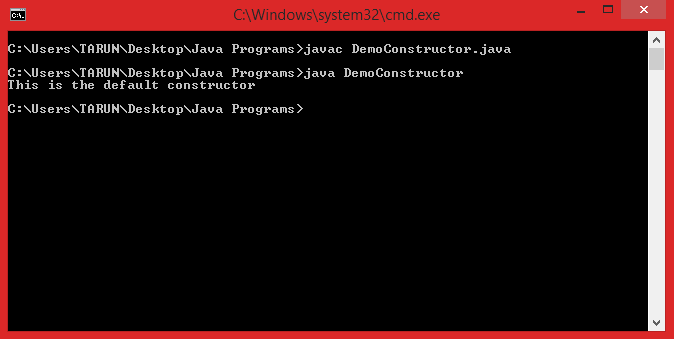
1:  class DemoConstructor  
2:  {  
3:       DemoConstructor()  
4:       {  
5:            System.out.println("This is the default constructor");  
6:       }  
7:       public static void main(String[] args)  
8:       {  
9:            // we called the default constructor with new keyword.  
10:            DemoConstructor obj = new DemoConstructor();  
11:       }  
12:  }  

Output :


Note : If the constructor is not implemented in the program than the default constructor is called automatically by Java run time environment but if we uses our own constructor in the program like above (It is also called constructor overloading) than the default constructor by java run time environment never called. 
So, constructor is optional in a class.

Parameterized constructor :

Parameterized constructor is the one which takes parameters and if we use that constructor than also the default constructor will be overloaded to the new parameterized constructor.
We can use more than one constructor at a time in a class with different signatures i.e. we can overload the constructor by different ways in a single class.

For example :

1:  class ParaConstructor  
2:  {  
3:       ParaConstructor()  
4:       {  
5:            System.out.println("Constructor with no parameters");  
6:       }  
7:       ParaConstructor(int first, int second)  
8:       {  
9:            System.out.println("Constructor with parameters");  
10:           System.out.println("The two integers entered are "+first+ " "+second);  
11:       }  
12:       public static void main(String[] args)  
13:       {  
14:            //Default constructor called  
15:            ParaConstructor obj1 = new ParaConstructor();  
16:            //Parameterized constructor called  
17:            ParaConstructor obj2 = new ParaConstructor(2, 5);  
18:       }  
19:  }  
Output :


Chaining of Constructors :

If any class inherits the properties of another class than that class can call the constructor of its parent class by the use of super keyword.

For example :

1:  class Parent  
2:  {  
3:       int length;  
4:       //a parameterized constructor  
5:       Parent(int len)  
6:       {  
7:            length = len;  
8:            System.out.println("The length in parent class is "+length);  
9:       }  
10:  }  
11:  class Child extends Parent  
12:  {  
13:       int breadth;  
14:       // a parameterized constructor of a child class  
15:       Child(int len, int br)  
16:       {  
17:            // call the parent class constructor  
18:            super(len);  
19:            breadth = br;  
20:       }  
21:       public static void main(String[] args)  
22:       {  
23:            Child obj = new Child(3, 6);  
24:       }  
25:  }  
Output :


Conclusion or all Properties of the Constructors :

1. Constructor is used for the automatic initialization of an object.

2. Every java program must contain a default constructor that will be without parameter and public type.

3. The name of the constructor is same as the name of the class.

4. A constructor has no return type and not even void because they implicitly return the class type itself.

5. A constructor can be private, public, default, protected.

6. A constructor never allowed static and final keyword with it.


Read more

Monday, 25 August 2014

Add Two Numbers In Java


You can add two numbers in java by two methods :

1.    By using the parameters at the time of execution of java program which are actually stored in the String array of main method. You can access that parameters by using the name of the array you passed in the main method with the index starting from zero.

The program  is shown below :

1:  class AddTwoNumbers  
2:  {  
3:        public static void main(String[] args)  
4:        {  
5:             int no1, no2;  
6:             //Get the first argument and parse it as int  
7:             no1 = Integer.parseInt(args[0]);  
8:             //Get the second argument and parse it as int  
9:             no2 = Integer.parseInt(args[1]);  
10:            //calculate the sum  
11:            int sum= no1 + no2;  
12:            System.out.println("Sum of two numbers is : "+sum);  
13:        }  
14:  }  

Output of the program :


Make sure that you enter only numbers if you will not enter numbers than it will show you the NumberFormatException because I have parsed the string of numbers as integers in the program. And also you have to enter minimum of two numbers with space at the time of execution of the program. The program takes first two numbers and after adding it will show you the sum of two numbers as output.

2. The second method may be use of Scanner class from java.util package. With the use of Scanner class you can ask to enter the numbers at run time from the user.

The program is shown below :

1:  import java.util.Scanner;  
2:    
3:  class AddTwoNumbersByScanner  
4:  {  
5:       public static void main(String[] args)  
6:        {  
7:             int no1, no2, sum;  
8:             System.out.println("Enter the two numbers ");  
9:             Scanner scan = new Scanner(System.in);  
10:            
11:            //Scan for the two numbers  
12:             no1 = scan.nextInt();  
13:             no2 = scan.nextInt();  
14:            
15:            //calculate the sum  
16:             sum = no1 + no2;  
17:             System.out.println("Sum of two numbers is : "+sum);  
18:        }  
19:  }  
20:    
21:    

Output of the program :


 Remember that you have to enter only the numbers because we are scanning for the numbers in the above program.
The above programs only enters the numbers in 4 bytes range which the size of any integer in java. If you want to add numbers more than 4 bytes you can use BigInteger class from java.math package.

The program is shown below :

1:  import java.util.Scanner;  
2:  import java.math.BigInteger;  
3:    
4:  class AddTwoNumbersBig  
5:  {  
6:       public static void main(String[] args)  
7:       {  
8:             System.out.println("Enter the two numbers ");  
9:             Scanner scan = new Scanner(System.in);  
10:             String no1 = scan.next();  
11:             String no2 = scan.next();  
12:             BigInteger first = new BigInteger(no1);  
13:             BigInteger second = new BigInteger(no2);  
14:             BigInteger sum = first.add(second);  
15:             System.out.println("Sum of two numbers is : "+sum);  
16:        }  
17:  }  
18:    

Output of the program :


Read more

Tuesday, 19 August 2014

ARRAYS IN JAVA


DEFINITION OF AN ARRAY :

An array is a group of similar data elements or it is a group of like-typed variables that are referred to by a common name.

For example, array of numbers like (1,2,4,8) these have same data type which is int.

Arrays of any type can be created and may have one or more dimensions.

Each item in an array (like 2 is one of the item in the above example) is called an element and each element can be accessed by its numerical index.

Note : Index in arrays is always starts from zero.

Consider the figure of array :


In the above diagram you can easily identify the difference between index and an element of array.

WHY WE USE ARRAYS :

This is the most common question for beginners in the programming that why we use arrays. 
You can understand this by considering the following example :

Suppose you want to use 100 or may be 1000 numbers which belongs to same type i.e. int ( may be to store the roll numbers of students ) than you want to create separate variables for each number you will use in your program if you don’t know about the arrays or the other alternative in that case you can use is that you can declare a 100 or 1000 number array which will save most of your time.

Declaration of an array :

 data_type[] name_of_array;  
Or
 data_type name_of_array[];  
Although the second form is only included as a convenience if you are coming from C/C++ but first form is preferred to declare arrays in java.

Initialization of an Array :

One way to create an array is with the new operator.

 name_of_array = new data_type[size_or_number_of_elements];  
   
 name_of_array[0] = 100; //Initialization of first element  
 name_of_array[1] = 200; //Initialization of second element  
   
The other way to initialize array is to directly set the elements. 
For example :

 int[] name_of_array = {1,5, 6, 23, 5, 2};  

One dimension arrays :

A one dimension array is, essentially, a list-typed variables like the one used in the above examples, they all are one dimensional arrays.

Example :
An array named myArray stores 5 numbers.

 int[] myArray; // array declared  
   
 myArray = new int[5]; // array allocates memory  
   

or you can combine these two steps into one step as :

 int[] myArray = new int[5];  

Now initialize the elements :

 myArray[0] = 4;  
   
 myArray[1] = 78;  
   
 .  
   
 .  

Or the other way to create this :


  int[] myArray = {4, 78, 23, 32, 1};  

Once the array is initialized you can access the elements by using the index which always starts from zero.

For example :
If you want to access element 3 than you can use the below statement to print the element 3 of an array.

 System.out.println("Element 3 is " + myArray[2]);  

Multidimensional Arrays :

Multidimensional arrays are actually array of arrays.

To declare a multidimensional array variable, specify each additional index using another set of square brackets.

For example :

  int [][] twoD = new int[3][4];  

Where the left dimension or first dimension specifies the number of rows and the other specifies the number of columns in the array.

A Program to make an array of 10 elements and print them on the screen is shown as an example :

1:  class ArrayDemo  
2:  {  
3:    public static void main(String[] args)  
4:    {  
5:      int[] myArray;  
6:      myArray = new int[10];  
7:    
8:      myArray[0] = 12; // remember the first element starts with zero index.  
9:      myArray[1] = 4;  
10:     myArray[2] = 6;  
11:     myArray[3] = 56;  
12:     myArray[4] = 34;  
13:     myArray[5] = 7;  
14:     myArray[6] = 7;  
15:     myArray[7] = 8;  
16:     myArray[8] = 23;  
17:     myArray[9] = 55;  
18:    
19:     //print the elements on the screen  
20:     for(int i=0; i<myArray.length; i++)  
21:     {  
22:        System.out.println("Element " + i+1 + ": " myArray[i]);  
23:     }  
24:    }  
25:  }  

Read more

Sunday, 2 February 2014

Packages in Java or what is a package?


DEFINITION :

In java, package is a set of classes, interfaces , enumerations etc which are grouped together.

Every class is definitely attached with some package.

MOSTLY USED PACKAGES IN JAVA :

java.lang : Basically provides classes related to printing and scanning.
java.io : provides classes related to input and output.
java.util : provides classes related to date and time.
java.awt : provides classes like Applet, Frame etc and used in applet programming.

To use the package classes, it should be imported with the use of import statement.
You can make your own package, define your own class in that and than you can use
that package and its classes in another package by importing.
These Java packages can be stored in compressed files called JAR files.

Note :

java.lang package is imported in every java program by default, you don't have a need 
to import that package in your program but if you want to use some input and output in your program than there is a need to import the java.io package.

How to declare a package?

Syntax:
package<space><package-name>;
e.g
 package myPackage;  

It should be the first statement in any java program.

How to import a package?
Syntax:
import<space><package-name><.><* or name of class you want to use from that package>;

e.g.
1. To import the class MyClass from myPackage
 import myPackage.MyClass;  

2. To import all classes from myPackage
 import myPackage.*;  

It should be declared after the package declaration outside the class.
Also, according to the code convention the package name should be used in small characters.

EXAMPLE :

1:  package abc;  
2:  import java.util.Date;  
3:    
4:  public class MyClass  
5:  {  
6:       //create a method which we will use in another package.  
7:       public void myMethod()  
8:       {  
9:            System.out.println("This is a different package.");  
10:              
11:            //to print the current date and time.  
12:            Date date = new Date();  
13:              
14:            //without importing the java.util.Date we cannot use the Date class.  
15:            System.out.println(date.toString());  
16:       }  
17:  }  


In another package we can use myMethod() as

1:  package xyz;  
2:  //import the abc package so that you can use the method.  
3:  import abc.MyClass;  
4:    
5:  class DemoPackage  
6:  {  
7:       public static void main(String[] args)  
8:       {  
9:            MyClass obj = new MyClass();  
10:            obj.myMethod();  
11:       }  
12:  }  
Read more

Sunday, 22 September 2013

Wrapper Classes/Type Wrapper in java


DEFINITION :

Wrapper classes in java as the name wraps or encapsulates the primitive data types such as int, char etc. and gives them an object like appearance which is mostly used in Collections because in Collections we can only add objects. They are also known as Type Wrappers because they convert the data types into a class type.

WHY WE USE THEM?

Since java is object oriented language in which every single element should be treated as object whether it is a file, image or anything but it uses primitive data types which are not actual objects and we cannot pass them by reference, they are passed by value and also we cannot make two references which refer to same data.
Java only uses these primitive data types for performance reasons and hence there should a way in which we can convert them into objects and for this designers create
Wrapper Classes.

Basically there are two important uses of wrapper classes :

1. To convert a primitive data types into objects, that is to give them an object form.
2. To convert strings into data types which is known as the parsing operations in which various methods such as parseInt(), parseFloat() etc. are used.

LIST OF WRAPPER CLASSES :

There are 8 wrapper classes for every data type in java. They all lies in java.lang package which is implicitly imported into our programs and hence they are available without importing any package.


These eight Wrapper classes provides methods and Constructors for making the object of primitive data types and getting back the value from object.

EXAMPLE OF USE OF WRAPPER CLASSES :

Consider the code,

int i = 100;
Integer ib = new Integer(i);

In the first statement 'i' is declared as the variable of int data type and then it it Wrapped or boxed into an object of the type Integer which is a wrapper class. This is also known as
boxing.
Now, this Integer type 'ib' can be used anywhere as an object.


We can also get back the data type from the object by using the method intValue() which is static in Integer Wrapper class as :

int iu = ib.intValue();

This is known as Unwrapping or Unboxing.
There are also some constants in the wrapper classes which gives you the maximum and minimum value of data types which is defined by the language. These are :
MAX_VALUE, MIN_VALUE

Here is another example of parsing a String as an integer through the Wrapper classes.

String s = "13";
int value = Integer.parseInt(s);

The method parseInt() gives the NumberFormatException if you pass the String which has a value other than int.

In the new versions of java there is way for autoBoxing and autoUnboxing.

//AutoBoxing
int i = 100;
Integer ib = i;

//AutoUnboxing
int iu = ib;

There is large use of Wrapper classes for object conversion in Collections.
Read more