Saturday, 4 May 2013

Why Java is Secure and Portable ?


The answer is
  BYTECODE.!

Bytecode it the key that makes Java language most secure and Portable.


When you compile your java program then on successful compilation , java compiler (javac) generates a class file with .class extension which contains the Bytecodes of your java program. Now the Bytecodes which are generated are secure and they can be run on any machine (portable) which has JVM.


No doubt Java is Platform Independent, but Java is JVM dependent.!
Actually , JVM is an interpreter for Bytecode.
The details of the JVM will differ from platform to platform, but all interpret the same Java Bytecode according to machine/platform.

The Bytecode which are generated by the compiler will be tested by the JVM on the execution of the program or we can say every Java Program is under the control of the JVM which checks the code on the runtime many times for viruses and any malicious.

The Bytecode generated by the compiler are also supported on any machine which has the JVM which makes Java a platform independent language.


What happens if Java Program were not compiled with Bytecodes?

If the Java Program were compile to native code (other than java language) , than different versions of the same program would have to exist for each type of CPU connected to the Internet. Thus, the interpretation of the bytecode is the easiest way to create truly portable programs.


Can Interpretation of Bytecodes makes the Execution Slower?

The answer is NO.!
Since, many old programming languages  like C, C++ etc. only compiled (whole code conversion to machine code) or interpret (line by line conversion) the code on execution but this is not the case with Java language which first compile the source program to Bytecode and than interpret the code on execution. Now this interpretation of the Bytecode is very fast and which makes the Java is much faster language than any other.

These are the reasons which makes Java the most Secure and Portable language than any other language.
Read more

Wednesday, 24 April 2013

Music – Something that makes us (HP Connected Indiblogger meet)


An Experience :

Last Saturday (20 April) , I had attended the indiblogger meet at Hilton Garden Inn Gurgaun Baani Square. I am sharing the experience of that meet with all of you which was organized by HP.
I am writing about music in my blog which is all about the java language just because I want to share the experience of my first indiblogger meet. There is a music on java too


 which encouraged me for writing the post about the music.

Although since the music is something that is connected with us in every way of life and makes us so, I could not stop mine for not sharing my views in the HP connected blogger meet.
Music gives us the inspiration to do everything we want. Whether you are sad , whether you are happy or whether you are feared than music is the one thing that feels you better. It is the art that changes your mood. We are living in the world of music. It is the feeling that creates us.
There were some pretty cool interviews in the meet.
Prateek Shah or rather more affectionately 'Prateeksha' made us all laugh to the core.!!


About HP connected service :
HP connected music service works with the windows 8 installed hp laptops. It gives us the service in which you can listen to over 1 million songs and 20,000 artistes which can be played with one click.
No need to pay for tracks again and again in this service. Music downloading for million songs is free for one year after activation of the service.

This service provided by hp because of the parternship with Universal Music and Hungama.
The site looks like this when you open it after the activation of the service :


With the help of this service you can find the latest talks about the artists. With the help of search bar you can search many of the artists or their songs in one click.
The installation steps are given in the website of HP.

This service  works with windows 8 installed hp laptops. There is no limit of downloading songs from HP connected Site once you have activated this service.
Note : These pros and cons are from my view. I am not responsible if you find any kind of changes in these pros and cons.

My Favorite Artist and the song :
One song that always remain close to my heart is- In the End by Linkin Park.


It is an ultimate sound of music for me. I first heard it in my college and it stayed in the heart for forever. The lyrics especially – “I tried so hard and got so far but in the end it doesn’t even matter” well expressed that I found myself listening to this song ever and ever again.
Other artists and their songs I want to hear are Mohit Chauhan , A. R. Rahman etc.

Music is a pure magic. It is a wonderful gift to humanity. We can express our emotions with the help of music. It is the thing that help you out of the selfish world.

Inspiration behind my love for music :

Inspiration is matter of finding something that we like. I like the music since my childhood. It is all the matter to find something that make you smile, rocks you and they all comes in the form of music. 
There is no way of telling what inspiration i have behind my love for music but it is the music which makes you feel good or bad according to the situation.
Music is something that is related to our soul not our body. It is a Universal language.

Conclusion :

If you have plan to buy a laptop and you are a music addict than must go for HP Notebook preinstalled windows 8 and enjoys the HP Connected music. Just try once this service and you will go to the world of music.
Read more

Friday, 19 April 2013

The 'new' operator in java


The 'new' operator in java is responsible for the creation of new object or we can say instance of a class.
Actually, it dynamically allocates memory in the heap with the reference we define pointed from the stack.
The dynamically allocation is just means that the memory is allocated at the run time of the program. The advantage of this approach is that your program can create as many or as few objects as it needs during the execution of your program.

For example :
Before creating a new object of the class we create the 'reference' variable of the class as

Demo obj;
(Where Demo is the class whose object we want to create)

Now this statement only creates a reference variable of a class or the "Demo" class data type.
There are data types such as integers, characters etc. but we don't need to create these with the help of
new operator because they are not implemented as objects in java rather they are implemented as normal variables because of the efficiency. Since all objects have some properties and behavior and require java to treat them differently than it treats the simple types.
Object version of these data types is also present with the help of wrapper classes which concept is not needed yet.
All the reference variables lies in the stack of the memory and hence 'obj' is .
Currently the reference "obj" is pointed to the null or it is not pointing to any object.

If we use the new operator than the actual or physical creation of the object is occurred.
The statement is :
obj = new Demo();

This statement does two things :
1. It creates the actual or physical object in the heap with the variable 'obj' pointing to the object from the stack.
2. It calls the constructor of the "Demo" class for the initialization of the object.


Basically, the "Demo()" in the statement is the default constructor.
A constructor defines what occurs when an object of the class is created.
Most real-world classes explicitly defines their own constructors within their class definition and if no explicit constructor is specified in the class then java will automatically supply a default constructor.

Also the two statements can be combined into one statement as :
Demo obj = new Demo();

Now at this time the 'obj' which has points to the actual object of the Demo class can call any not restricted methods.
Consider the case, when we declare another reference of the class and equating that variable with the previous reference i.e, obj
Demo obj1;
obj1 = obj;

It is to be noted that the above statement cannot create new object in the memory but the 'obj1' reference variable now points to the same object which is pointed by the 'obj'


Also at any time if we point 'obj' object to null than it does not mean than the 'obj1' object is destroyed.

obj = null;

This means that the 'obj1' object will points to the same object but the 'obj' will not points to any object.


So, this is all about the 'new' operator.
Read more

Wednesday, 10 April 2013

ACCESS SPECIFIERS/MODIFIERS IN JAVA


ACCESS SPECIFIERS/MODIFIERS IN JAVA


Access Specifier/Modifier in any language defines the boundary and scope for accessing the method, variable and class etc.

Java has defined four types of access specifiers. These are :
1.    Public
2.    Private
3.    Protected
4.    Default

If you do not define any access specifier/modifier than java will take “default” access specifier as the default for variables/methods/class.

SYNTAX For declaring a class with access specifier :
<access-specifier><class-keyword><class-name>

For e.g.
public class Demo

    public access specifier :
If you declare any method/function as the public access specifier than that variable/method can be used anywhere.

public Access Specifier Example :
   package abc;  
   
 public class AccessDemo  
 {  
   
      public void test()  
      {  
            System.out.println("Example of public access specifier");  
      }  
 }  

In any other package if we want to access the class "AccessDemo" then we only need to import the abc package as shown in the following code :

    package xyz;  
 import abc.AccessDemo;  
   
 public class AccessExample  
 {  
   
      public static void main(String[] args)  
      {  
           AccessDemo ad = new AccessDemo();  
           ad.test();  
      }  
 }  

     private access specifier :
If you declare any method/variable as private than it will only accessed in the same class which declare that method/variable as private. The private members cannot access in the outside world. If any class declared as private than that class will not be inherited. :

private Access Specifier Example :

    class AccessDemo   
 {  
       private int x = 56;  
   
      public void showDemo()   
      {  
           System.out.println("The Variable value is " + x);  
      }  
    
      private void testDemo()   
      {  
           System.out.println("It cannot be accessed in another class");  
      }  
 }  
    
   
 public class AccessExample   
 {  
    
      public static void main(String[] args)   
      {  
           AccessDemo ad = new AccessDemo();  
           ad.testDemo(); // Private method cannot be used  
           ad.x = 5; // Private variable cannot be used  
    
           ad.showDemo(); // run properly  
      }  
 }  
   

    default access specifier :
If you define any method/variable as default or not give any access specifier than the method or variable will be accessed in only that package in which they are defined.

They cannot be accessed outside the package.

default Access Specifier Example :

In one package we define the variable default as below code :

    package abc;  
   
 class AccessDemo   
 {  
      default int a = 4;  
 }  

Now in any other package if we want to change the value of a, it is not possible because the other package has not access permission for "a" variable.

 package xyz;  
 import abc.AccessDemo;  
   
   
 class AccessExample   
 {  
      public static void main(String[] args)  
      {  
           AccessDemo ad = new AccessDemo();  
           ad.a = 67; //It is not possible.  
      }  
 }  

    protected access specifier :
It has same properties as that of private access specifier but it can access the methods/variables in the child class of parent class in which they are declared as protected.

When we want to use the private members of parent class in the child class then we declare those variables as protected.

protected Access Specifier Example :

 class AccessDemo   
 {  
      protected int x = 34;  
    
       public void showDemo()   
      {  
            System.out.println("The variable value is " + x);  
       }  
 }  
    
 class ChildAccess extends AccessDemo  
 {  
       // child class which inherits  
       // the properties of AccessDemo class  
 }  
    
 public class AccessExample   
 {  
    
       public static void main(String[] args)   
      {  
            ChildAccess ca = new ChildAccess();  
    
            ca.showDemo(); // run properly  
            ca.x = 45; // run properly  
 }   
 }  
Read more

Friday, 8 March 2013

FIRST JAVA PROGRAM - HELLO WORLD!


In order to write your first Java Program, you require :
1. JDK installed on your computer.
    You can install it from here : 
    http://www.oracle.com/technetwork/java/javase/downloads/index.html

2. Setting of environmental variable path.

3. A simple text editor.

First Java Program - Hello World!

The code looks like this :


After writing the above code in notpad, save it anywhere with filename "Hello.java".
Note : All the java programs must be saved with the name equal to classname with an extension .java.

Now for compiling open the command prompt and go to the location of your file in which the java code was saved and type :

javac Hello.java

and press enter. 


If nothing happens it means the program is correct or not containing any error.
Now you need to Execute the program and for executing just type :

java Hello

and press enter


Now you can see that the output is "Hello World!" shown in the cmd.

EXPLANATION OF PROGRAM :

The code is shown as :


public class Hello
{
public static void main(String[] args)
{
System.out.println("Hello World!");
}
}

Since java is based on object oriented concepts, hence all the code must be stored in a class.
In above i am taking a class named "Hello" . You can use any name but make sure that the code is stored with the same name as that of the class . This is because when the code is compiled using java compiler then a class file (which contain byte codes)  is created with the same name as that of your file name.
And when you execute your program then the JVM (Java Virtual Machine) search for the class file and by using the name of class file it finds your program.
So, we can say that the name of file is same as that of the class name because JVM easily linked the class file with program file.

Now in the class there is a main method, which starts the execution of program.
In main method "public" is used as access specifier.
"static" is used because we want the main method should be run without making the objects of the class.
"void" is used because method is not return anything.
and parameters is passed as "String[] args" for handling the input given by user, which is not used in this program.

"System.out.println()" method is used for writing the output on the screen.

Read more

Wednesday, 6 March 2013

SETTING OF ENVIRONMENTAL VARIABLE PATH FOR JAVA


HOW TO SET THE ENVIRONMENTAL VARIABLE PATH FOR JAVA.


In Windows inorder to set

Step 1 : Right Click on  "My Computer"  and click on properties .


Step 2 : Click on Advanced tab


Step 3: Click on Environment Variables


Step 4: Now copy the path of your jdk/bin from the program files which lies in the folder named java in your computer where you install the jdk.
It is mostly stored in the C - drive.
Make sure that you choose jdk not jre.


Now copy the path as shown below..


Step 5: Now go to the Environment variables dialog box and create a new class path  
                 for JAVA_HOME.


Step 6 : Paste the path in the "variable value" column and set "variable name" as path.

After editing click OK.
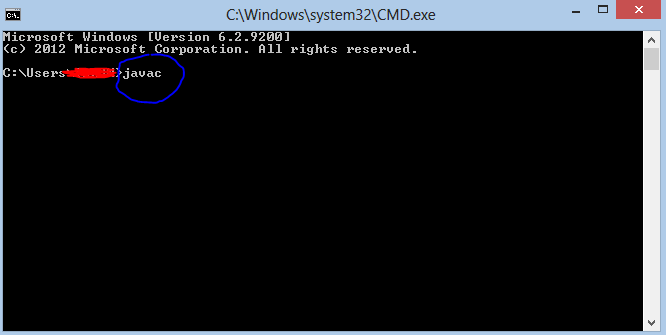
Step 7 :Your are done setting up your environment variables for your Java , In order to test it go to command prompt and type
  javac


Now click "Enter" and If you get the output as shown below your path for java is set.


If you have any problem regarding this please comment below.

Read more